Navigation
The OCMP navigation is located on the left side and is divided into several logically separated areas. It provides quick access to all central platform functions.
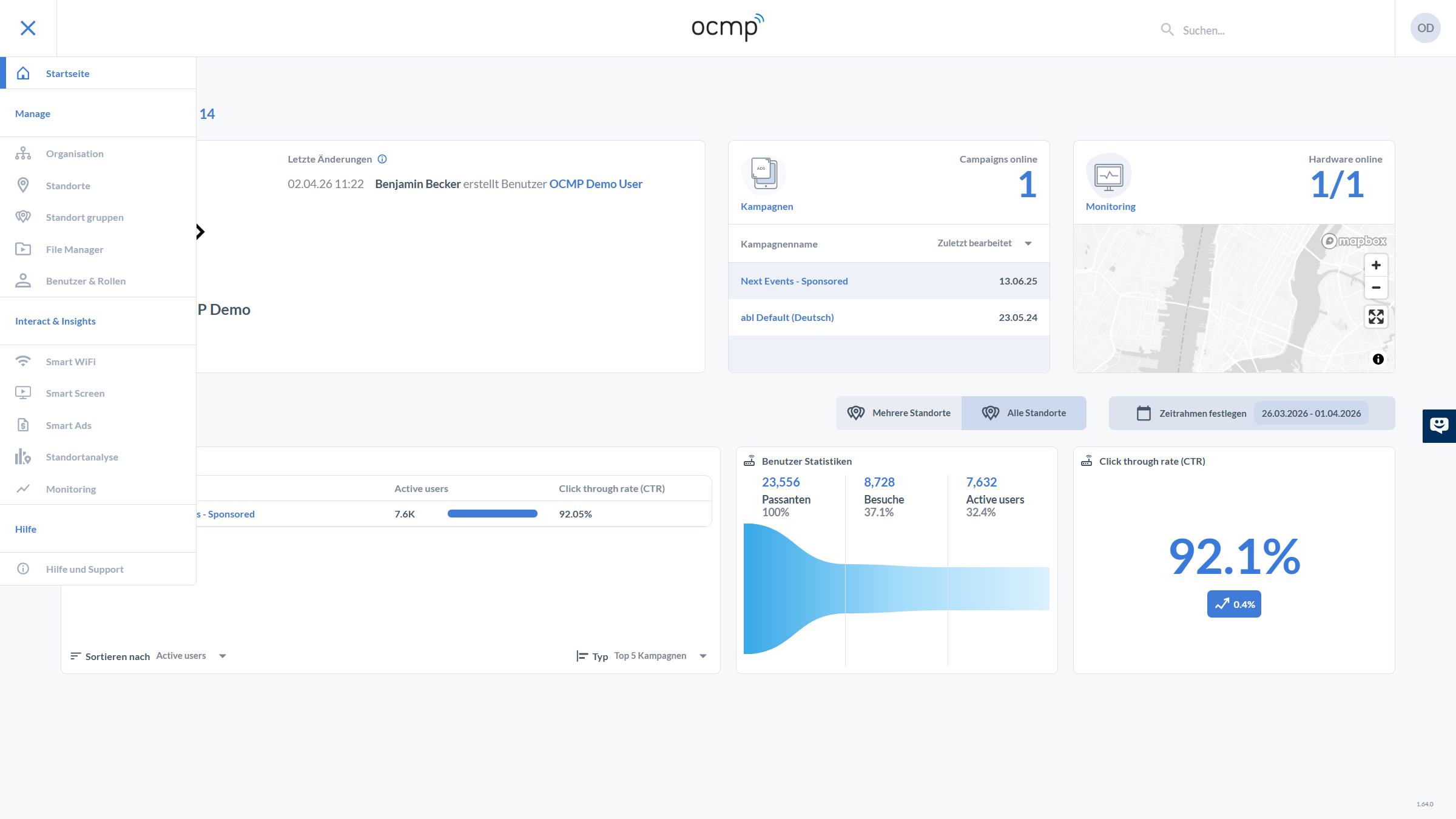
Home
- Home
Entry point to the dashboard with an overview of:
- KPIs
- campaigns
- monitoring
- activities
It serves as the central control and analytics interface.
Manage
This area includes administrative functions for managing the platform:
- Organization Management of the organizational structure
- Locations Management of individual locations
- Location Groups Grouping of locations for easier control
- File Manager Management of media such as images, videos, or documents
- Users & Roles User administration as well as permission and role concepts
Interact & Insights
This area contains the operational and analytical functions of OCMP:
- Smart WiFi Creation and management of WiFi campaigns
- Smart Screen Control and management of digital signage content
- Smart Ads Management and delivery of external advertising content
- Location Analytics Evaluation of user data and location metrics
- Monitoring Monitoring of devices, infrastructure, and system status
Note
Depending on the subscribed products and assigned user permissions, more or fewer navigation items may be visible.