Cisco Meraki
Onboarding for Using OCMP Location Analytics (Smart WiFi)
Overview
Meraki Location Analytics makes it possible to capture movement and presence data from devices in the WiFi network and process it further in OCMP. This creates reliable, anonymized analyses of visitor flows, dwell times, and usage patterns within a location. The technical basis is the Meraki scanning API, through which event data is transmitted to the platform in real time.
Before starting the setup, you must contact the technical support of abl solutions GmbH. Phone: 0911 477 157-77 Email: support@abl-solutions.com
There you will receive your individual Post URL including Location Key as well as the Validator. Without this information, a working integration is not possible. There you will receive your individual Post URL including Location Key, and support will require the Validator. Without this information, a working integration is not possible.
Navigation in the Meraki Dashboard
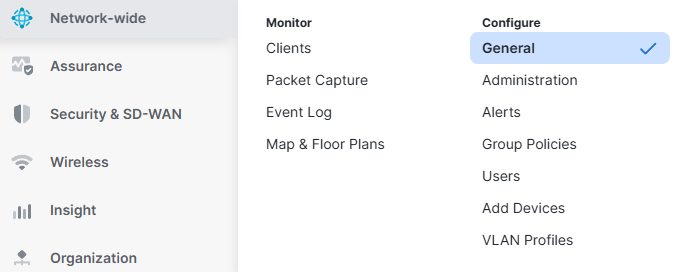
In the Meraki dashboard, open the Network-wide area, then switch to the Configure section and select the General menu item. This central configuration view contains all relevant settings for Location Analytics.
Configuring Location and Scanning
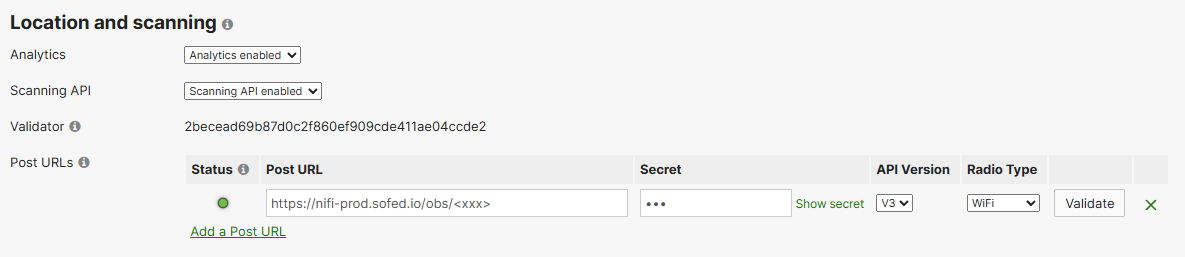
In the Location and Scanning section, first enable the required functions. Set both Analytics and the Scanning API to enabled. This allows the access points to collect and forward relevant telemetry and movement data.
Then enter the values provided by support. The Post URL already contains a unique assignment to your system and must not be changed. The Validator must be entered exactly, as it is used to verify the data source. In addition, define a Secret to secure communication and enable authentication between Meraki and OCMP. The API version used is V3, while the Radio Type must be set to WiFi.
The combination of Post URL, Validator, and Secret ensures that data is assigned uniquely, authenticated, and transmitted securely. These parameters are essential for a stable and tamper-resistant integration.
After all fields have been entered correctly, save the configuration using Save changes. From this point on, the access points will begin transmitting data automatically.
Functionality and Data Processing
After successful setup, the Meraki access points continuously send scan events to OCMP. These are processed, normalized, and prepared there for analysis. This results in meaningful key figures about the behavior of end devices within the network. Typical evaluations include visitor frequencies, return rates, and dwell times, while all data is processed anonymously.
Recommendation for Larger Environments
In larger networks, integration via the Meraki API is recommended. This makes it possible to roll out configurations automatically, manage multiple locations centrally, and control changes efficiently.
Especially in distributed infrastructures or organizations with many sites, this approach reduces manual effort significantly and ensures a consistent configuration.
Security and Data Protection
Data transmission is encrypted via HTTPS. The defined Secret ensures that only authorized systems can send data to OCMP. The use of the Validator also verifies whether the data source is trustworthy. Processing within OCMP is anonymous and designed for privacy-compliant analytics.
No personally identifiable data is processed in plain text. All analyses are based on anonymized and aggregated information.